Thai aerospace entrepreneur committed to helping fight climate change

#SootinClaimon.Com : ขอบคุณแหล่งข้อมูล : หนังสือพิมพ์ The Nation.

https://www.nationthailand.com/business/tech/40023080

Thai aerospace entrepreneur committed to helping fight climate change

Thai aerospace entrepreneur committed to helping fight climate change

WEDNESDAY, DECEMBER 14, 2022

Chanapat Komlongharn

“We do want to search for alternative resources in space as well as build sustainability awareness on natural resources to help preserve nature for our next generations, as doing business is not our only objective”, said Varayuth Yenbamroong, the founder and CEO of mu Space.

Founded in 2017 by Varayuth, who previously worked as a satellite systems engineer in the US, mu Space and Advance Technology Co Ltd aims to manufacture small satellites.

The company organised its annual event, “Techday 2022”, on November 9, under the theme – “Connecting you to space” at mu Space’s factory. The firm announced its strategic plans for the current and upcoming years to business partners, shareholders and customers.

Thai aerospace entrepreneur committed to helping fight climate change

Varayuth said that as the global population recently hit 8 billion, it has become necessary to look for new resources and raise awareness about the sustainability issue.

“In 2017, we saw the depletion of natural resources due to the soaring population. If our resources are not sustainable, they will affect humanity. Hence, we need to search for alternatives from outer space, such as from the moon, as is stated in our 10-year plan,” he added.

To accomplish its goals, mu Space Corp has also put the focus on new industries such, as satellite components, battery, and chip manufacturing.

“The traditional satellite production requires a longer supply chain and cannot maximise energy used in a satellite, so we would like to use our technology to magnify the energy system in a satellite,” said Varayuth.

 Varayuth Yenbamroong, the founder and CEO of mu Space.Varayuth Yenbamroong, the founder and CEO of mu Space.

The highlights of mu Space Corp products developed in 2022 are Satellite B-200 and B-500. Satellite B-200 is priced at US$4 million, and B-500 has not yet reached commercial operation.

Mu Space has also invented space technologies, such as remote-sensing to monitor greenhouse gases and manage the impact of climate change as well as to build a commercial space supply chain prioritising local manufacturing.

The company has also joined hands with many other private and public organisations, such as UK SSTLGistda, and especially Amazon Web Services (AWS).

AWS’s Asia Pacific regional account manager Laurent Tran Dien said that “Now, there are more and more satellites being launched, and more data coming from space. There are more missions to the moon and Mars. More and more companies are building infrastructure, so we help customers bring solutions on cloud [technology] to rethink, reinvent, simplify, and scale up businesses quickly through cloud [technology] adoption.”

Abdul Satar Adila, AWS’s business lead for Asean, added that AWS aligns with Thailand’s 4.0 economic model, “as we support the drive of technology and creativity”. AWS has invested around $5 million as it wants to bring the cloud to all Thais.

The company currently operates three industrial factories. All their production systems focus on sustainability, such as using alternative energy sources, having recycling processes, and reducing carbon dixie emissions.

Around 50-100 participants were attending “Techday 2022”, most of them professionals in the space industry.

Thai aerospace entrepreneur committed to helping fight climate change

Chanapat Komlongharn

Tech Review: iPad Gen 10: Sleeker, slimmer, smarter

#SootinClaimon.Com : ขอบคุณแหล่งข้อมูล : หนังสือพิมพ์ The Nation.

https://www.nationthailand.com/business/tech/40022983

Tech Review: iPad Gen 10: Sleeker, slimmer, smarter

Tech Review: iPad Gen 10: Sleeker, slimmer, smarter

SUNDAY, DECEMBER 11, 2022

Apple’s latest iPad line-up – the 10th generation – is thinner, sleeker and far more powerful than its predecessor, the iPad Gen 9.

The iPad is Apple’s entry-level tablet computer, below the iPad Pro and iPad Air.

In the new iPad Gen 10, Apple has removed the physical home button and made the display far larger at 10.9 inches versus the 10.2-inch display of its Gen 9 iPads.

The display resolution has also been improved to 2360×1640 pixels from Gen 9’s 2160×1620 pixels.

The new iPad is also just 7mm in thickness and weighs a mere 477 grams compared to Gen 9’s 7.5mm and 487g.

Now that the new iPad no longer has the home button, its Touch ID is integrated with the power button at the top right edge, which is very convenient.

The new basic iPad also does not use Apple’s own lightning port, but the more universal USB-C port. This means that charging the iPad is far easier if you happen to have lost the cable that came with it.

Tech Review: iPad Gen 10: Sleeker, slimmer, smarterThe iPad Gen 10 is powered by Apple’s A14 Bionic with Neural Engine, which delivers 20% better performance than Gen 9. The A14 Bionic has six cores – two performance cores for handling heavy tasks and four high-efficiency cores for handling everyday tasks.

The A14 Bionic’s four-core graphic engine also delivers a 10% boost in performance for extensive graphic tasks like photo and video editing and game playing.

The Neural Engine in A14 has 16 cores, twice more than the A13 Bionic chip. The new Neural Engine can compute 11 trillion operations per second, so the machine learning tasks of the new iPad are 80% faster. The tasks include Live Text recognition in photos and videos, subject lifting from photos and face recognition.

Tech Review: iPad Gen 10: Sleeker, slimmer, smarterThe A14 Bionic chip uses the 5-nanometre process technology, compared to 7nm of A13, so the new chip uses less power. With less power use, you can use the iPad with peace of mind as the battery can last for about 10 hours for general tasks.

While testing, I found the new iPad handled most tasks smoothly. Websites were rendered quickly and smoothly, while there were no performance hiccups with music and video files.

Its bright, high-resolution display is great for watching films streamed via Apple TV or YouTube. Plus, its two landscape stereo speakers expand the sound stage to make games and films more exciting.

I tried the popular Ragnarok Mobile game with a high graphic display setting and it ran smoothly.

The iPad Gen 10 comes with Bluetooth 5.2 wireless connection, compared to Gen 9’s Bluetooth 4.2. The upgraded Bluetooth 5.2 allows quick connection to the AirPods Pro earbuds. The sound quality was also impressive.

Tech Review: iPad Gen 10: Sleeker, slimmer, smarterGen 10’s cameras are also an improvement. Now the front camera is at the centre of the landscape edge, instead of on the vertical screen like in previous models. This means video calls offer a far better view of your chat partner. Plus, its location will ensure you are always looking at the camera while on FaceTime or recording clips.

Its back camera now has a 12-megapixel resolution with a brighter f/1.8 aperture lens, compared to the 8MP resolution and f/2.4 lens of Gen 9. The new iPad also lets you record videos at 4K resolution compared to Gen 9’s 1080p.

Like Gen 9, the new iPad supports Apple Pencil version 1, provided you have the USB-C adaptor.

The Apple Pencil opens new doors to creativity as with it you can handwrite notes, draw, sign documents, mark up PDF files or retouch photos with precision.

If you’re used to the more expensive Apple Pencil 2, you may find the earlier version a little unresponsive, but I found that it does the job perfectly well.

Several apps like Notes, Mail, Numbers and Keynote have also adapted to the Apple Pencil and there are plenty available in the App Store.

I found that when I used the Apple Pencil on Notes, the app converted my handwriting into text mostly correctly.

The new iPad runs on iOS 16 which comes with several improved features that allow you to conveniently share and communicate with friends and contacts.

For instance, its Messages app now lets you edit or unsend a message you have just sent. You can also “unread” a message if you want time to respond.

Another useful feature is the function that allows you to remove backgrounds in photos. This function is available in Photos, Screenshot, Quick Look and Safari web browser. You simply tap on the subject, hold and a copy option will pop up for you to lift and paste the subject into another app.

The new iOS also allows you to pause videos on any frame that contains text so you can copy, translate, search or share the text.

Tech Review: iPad Gen 10: Sleeker, slimmer, smarterThe iPad can also be expanded with the new optional Magic Keyboard Folio that easily snaps to the Smart Connector on the left side of the iPad Gen 10 and turns it into a notebook.
The keyboard has large keys and is easy to use. There are also 14 function keys that allow you to quickly adjust the volume or display brightness among other things.

The trackpad is also fairly large and allows you to control the onscreen cursor like you would with a notebook computer.

The basic iPad Gen 10 with Wi-Fi and 64GB storage only retails for 17,900 baht, while the equivalent with Wi-Fi and cellular goes for 23,900 baht.

Key specs:

Operating system: iOS 16

Chip: A14 Bionic chip with 6-core CPU, 4-core graphics, 16-core Neural Engine

Cameras: 12MP f/1.8 back camera, 12MP ultrawide f/2.4 front camera

Microphones: Dual

Wireless: Wi-Fi 6 (802.11ax), Bluetooth 5.2

Cellular models: 5G, LTE, UMTS/HSPA/HSPA+

SIM card: Nano-SIM, eSIM

Battery: 28.6-watt-hour lithium-polymer battery

In the box: iPad, USB-C Charge Cable, 20W USB-C Power Adapter, USB-C to Apple Pencil Adapter

Paisal Chuenprasaeng

special to The Nation

Previous reviews:

ThinkPad X1 Carbon Gen 10: Beautiful, thin, sleek and powerful

Sony Xperia 5 IV: Every budding photographer’s dream come true

Acer Nitro 5 2022: Affordable option for gamers with limited funds

Tencent Cloud presents ‘Cloud-AI’ solutions at “Digital Night 2022”

#SootinClaimon.Com : ขอบคุณแหล่งข้อมูล : หนังสือพิมพ์ The Nation.

https://www.nationthailand.com/pr-news/business/tech/40022906

Tencent Cloud presents 'Cloud-AI' solutions at "Digital Night 2022"

Tencent Cloud presents ‘Cloud-AI’ solutions at “Digital Night 2022”

FRIDAY, DECEMBER 09, 2022

At the gathering event by leading Thai digital associations on December 8, in Bangkok, Tencent Cloud, the cloud business of global technology company Tencent – reaffirms its vision to be a ‘Digital Enabler’, aiming to empower Thai organizations and businesses to accelerate digital transformation with its efficient, stable, and secure cloud-AI solutions.

Recently, Tencent Cloud participated in Digital Night 2022, organized by seven digital associations that play significant roles in the implementation of digital technology in Thailand.

The associations include the Association of Thai Software Industry (ATSI), Thai IoT AssociationThai Startup AssociationThai Programmer Association (TPA), Digital Technology Entrepreneur Trade Association (DTEA), Thai E-Commerce Association, and Metaverse Association of Thailand (Thai Metaverse).

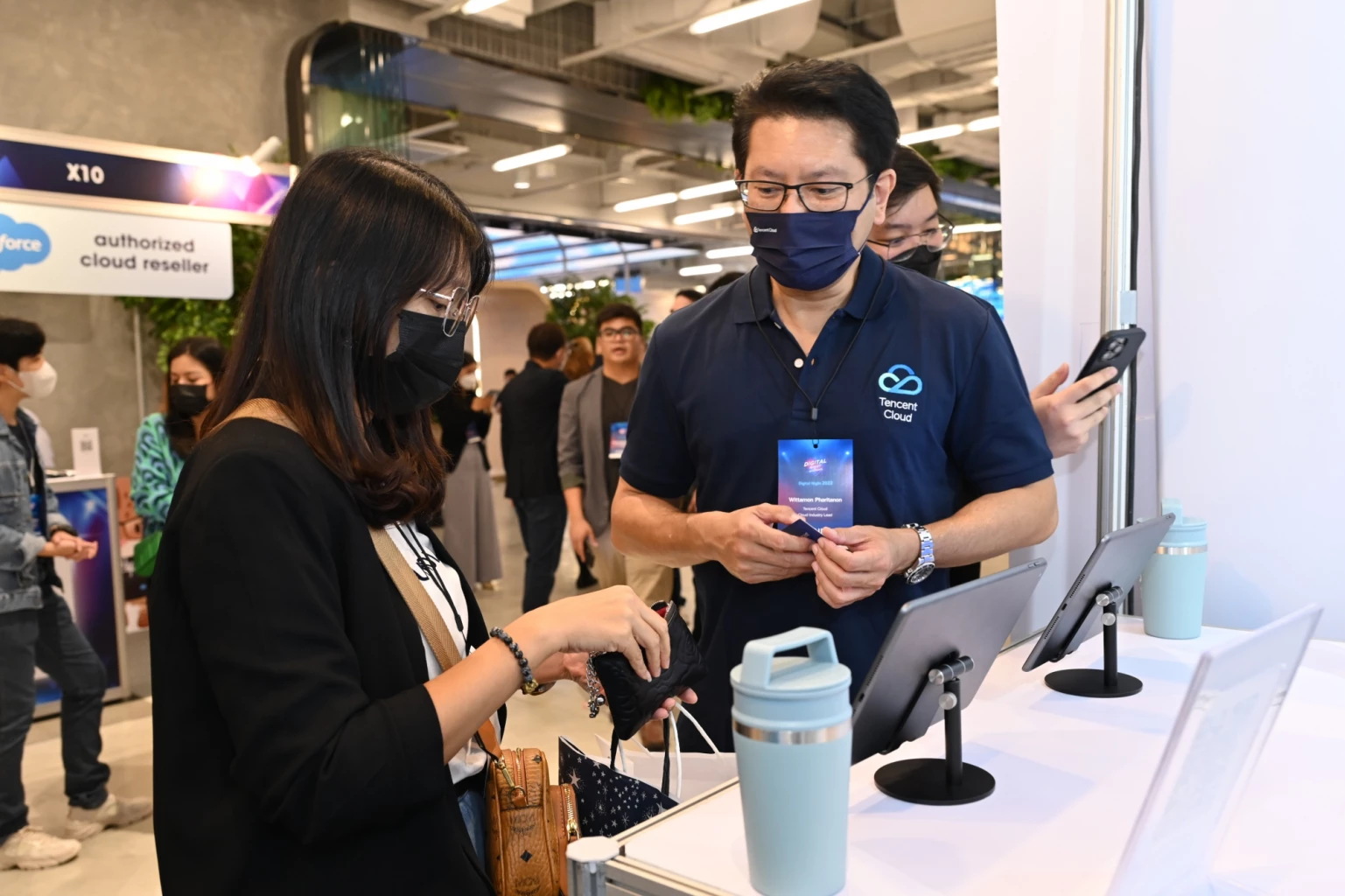
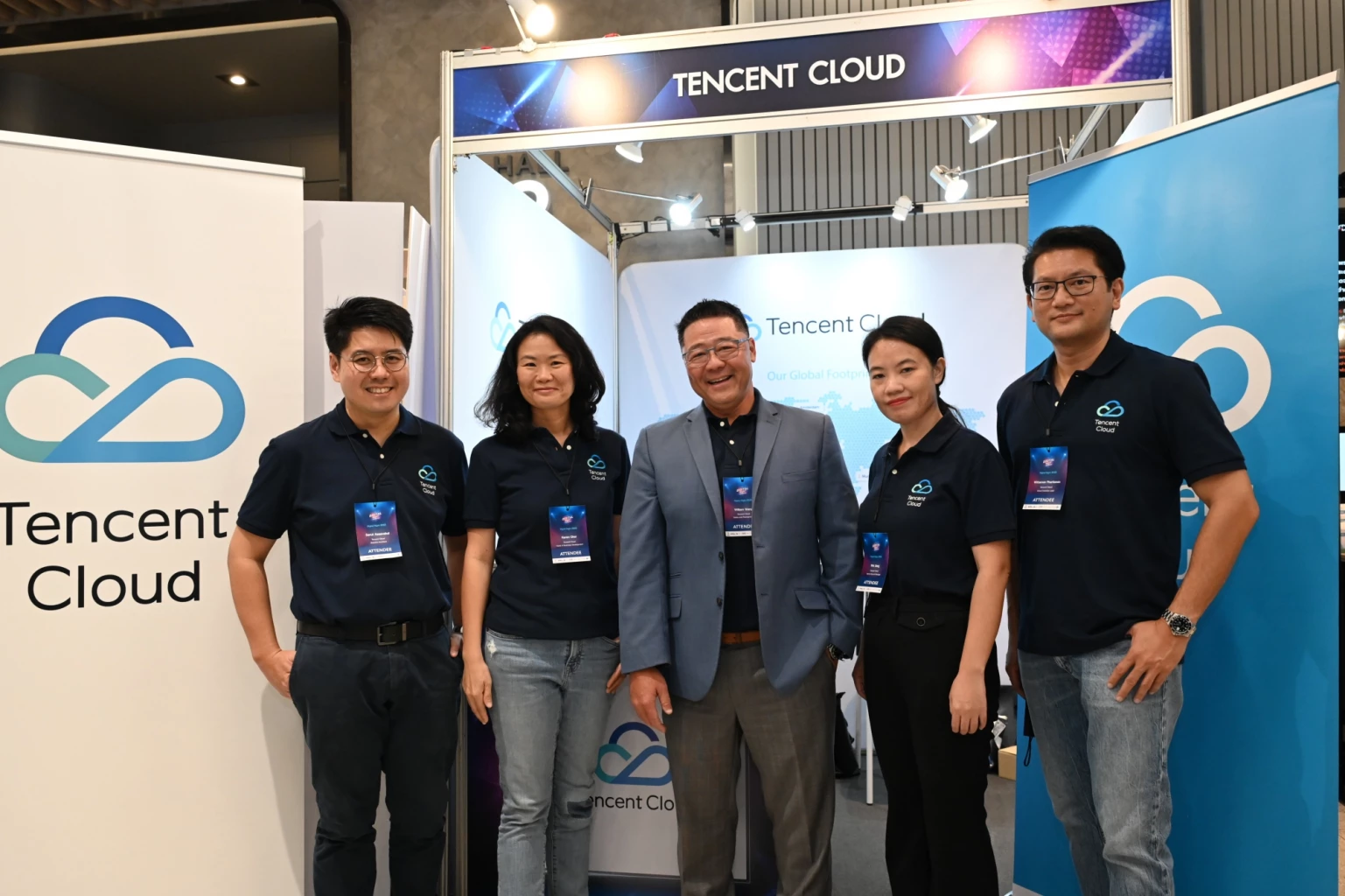
At the event, Tencent Cloud set up a booth showcasing products and services that are able to meet a wide range of company needs, and was supported by a team of Tencent cloud and AI specialists to provide insight into the following cloud solutions:

Tencent Cloud presents 'Cloud-AI' solutions at "Digital Night 2022"

Tencent Cloud EdgeOne: a platform that provides security protection and acceleration services for networks which can be tailored based on different business requirements.

Tencent Real-Time Communication: a product that allows developers to build solutions for audio calls, video calls, interactive live, and on-cloud recording which ensures stability, fast data transmission, and seamless communication.

Tencent Cloud solutions for Web3 & Metaverse: a suite of easy-to-use and secure tools and infrastructure that enables users to create and scale Web3 as a way of growing their businesses and acquiring new consumers. It also provides one-stop technical services that support enterprises to build their metaverse projects.

Tencent Cloud presents 'Cloud-AI' solutions at "Digital Night 2022"

Tencent Cloud aims to escalate efficiency and agility for organizations in various industries with a secure network and high efficiency combined with expertise and an in-depth understanding of large-scale platforms. Leveraging on strong infrastructure, Tencent Cloud operates in 70 availability areas in 26 regions across the world and has 2 data centres in Thailand that ensure fast transmission, and stable and secure data transfer for all enterprises.

Thai innovation UNC Calcium won the gold medal in Germany

#SootinClaimon.Com : ขอบคุณแหล่งข้อมูล : หนังสือพิมพ์ The Nation.

https://www.nationthailand.com/business/tech/40022865

Thai innovation UNC Calcium won the gold medal in Germany

Thai innovation UNC Calcium won the gold medal in Germany

THURSDAY, DECEMBER 08, 2022

Thai brands have recently won the hearts of the world. The Thai innovation from Yoo Fish Ball Yoawarat was the gold medal winner in world-class inventions on the environment in Germany

Keyoon Choklumlert, an executive chairman of Yoo Fishball Co Ltd and founder of UNC Natural dietary supplement, said that it was an honour to represent Thailand, and able to bring innovative “products” UNC Calcium (UNC Calcium 100% from natural extract) was used medically and the body absorbs better than other forms of calcium. 

It is the product that has received the first prize for innovation for the environment and consumer safety (World Competition of Green Invention Award).

The “product” is a natural production process by bringing waste materials from marine fish processing to add value and develop into medical innovations. 

To prevent and rehabilitate osteoporosis. It can strengthen and repair damaged bones and teeth. 

According to the research, it can increase bone cells which effectively helps to inhibit and reduce bone pain.

It helps bone mass to be denser and adds moisture to bone mass to make it easier to move while it does not affect the digestion process or cause flatulence or constipation like other forms of calcium.

Chulalongkorn University confirms that UNC calcium can stimulate the growth of bone stem cells and is non-toxic to cells after long-term exposure to UNC calcium. 

Keyoon explained further that this success comes from the support from the Thai Chamber of Commerce, the National Innovation Agency (NIA) and the National Research Agency (NRCT), for providing research funds for continuous development over the past 5 years for medical use.  

As a result, the products have received 27 prestigious gold medals both domestically and internationally. UNC Calcium Plus products received the National Innovation Award in 2020.

It is also a green business BCG (Bio Circular Green Economy) for the world of consumer safety and the environment.

Nasa to boost space mission in Thailand next year

#SootinClaimon.Com : ขอบคุณแหล่งข้อมูล : หนังสือพิมพ์ The Nation.

https://www.nationthailand.com/business/tech/40022830

Nasa to boost space mission in Thailand next year

Nasa to boost space mission in Thailand next year

WEDNESDAY, DECEMBER 07, 2022

Thailand is tapping Nasa expertise to set up its northern “space lab” in Chiang Rai province.

Nasa delegation has been invited to visit the Space Technology Laboratory at Wiangpapao Technical College on January 25 to exchange knowledge on the development of space affairs.

The knowledge exchange was agreed at a videoconference meeting between Nasa officials and the House committee on communications, telecoms and digital economy and society,its vice chair Settapong Malisuwan said on Tuesday.

Nasa to boost space mission in Thailand next year

Discussion during the meeting covered US-Thailand cooperation on space technology, climate change, global warming and natural crises, Settapong said. Nasa is interested in these problems because they impact the whole globe, he added.

Nasa to boost space mission in Thailand next year

Cooperation with Nasa would also help Thailand in surveying, analysing, and forecasting the weather, he said. Accurate weather forecasts are seen as vital to boosting agriculture and combating impacts of the seasonal drought-flood cycle in Thailand.

Nasa to boost space mission in Thailand next year

The space technologies developed with Nasa would help Thailand solve crises, conserve natural resources, and plan agricultural output for the next 5-10 years, Settapong said.

Nasa to boost space mission in Thailand next year

Related stories

Interested in exploring Bangkok’s Ratchaprasong intersection? Richa can be your guide

#SootinClaimon.Com : ขอบคุณแหล่งข้อมูล : หนังสือพิมพ์ The Nation.

https://www.nationthailand.com/business/tech/40022535

Interested in exploring Bangkok’s Ratchaprasong intersection? Richa can be your guide

Interested in exploring Bangkok’s Ratchaprasong intersection? Richa can be your guide

MONDAY, NOVEMBER 28, 2022

A virtual influencer, “Richa”, is ready to act as a guide to people interested in visiting attractions in the Ratchaprasong intersection of Bangkok.

Richa was developed by the Ratchaprasong Square Trade Association (RSTA) and Thailand Convention and Exhibition Bureau (TCEB) under the concept of “taking people to visit attractions online”.

Interested in exploring Bangkok’s Ratchaprasong intersection? Richa can be your guide

“This move aims to enable people of all generations to visit attractions in the Ratchaprasong intersection without using Google Map application,” the RSTA and TCEB said.

Interested in exploring Bangkok’s Ratchaprasong intersection? Richa can be your guide

Richa will provide information about the Ratchaprasong intersection, such as routes, eateries, and places where eight Hindu gods and goddesses are enshrined.

Interested in exploring Bangkok’s Ratchaprasong intersection? Richa can be your guide

“Richa is a young woman with youthful characteristics, such as being friendly and liking to learn new things,” the RSTA and TCEB said, adding, “People can enjoy travelling and spending time in the intersection.”

Interested in exploring Bangkok’s Ratchaprasong intersection? Richa can be your guide

Interested people can meet Richa on the website www.bkkdowntown.com or Facebook Page: We Love Ratchaprasong.

Interested in exploring Bangkok’s Ratchaprasong intersection? Richa can be your guide

Related stories:

Cyberbullying: How you can protect yourself

#SootinClaimon.Com : ขอบคุณแหล่งข้อมูล : หนังสือพิมพ์ The Nation.

https://www.nationthailand.com/pr-news/business/tech/40022500

Cyberbullying: How you can protect yourself

Cyberbullying: How you can protect yourself

SUNDAY, NOVEMBER 27, 2022

November is a month when cyberbullying becomes the most-discussed topic around the world. The International Day against Violence and Bullying is marked on the first Thursday of the month, the United Kingdom dedicates an entire week to the issue and countries unite together to find ways to control cyberbullying.

Kaspersky experts have collected a range of tips for adults and children on what they can do if they’re bullied, and how they can protect themselves.

What kids can do to protect themselves from cyberbullying:

•    Set private settings
Parents teach children not to talk to strangers on the street. So why don’t we talk about the same rule, but for the online space? If it is impossible to completely protect yourself from the same bully neighbour, it’s also possible to do it on a personal account across social networks. Guides on how to do this are available on Facebook, Instagram, Twitter, Twitch, Reddit. 

•    Do not answer
Reacting with offensive words will only escalate the situation. Trying to reason with the bully without the participation of adults is also not worth it. Ignoring them is the only way to protect yourself from a further abyss of clarifications, insults and the like.

•    Block the aggressor, complain to the moderators
Many websites and all social networks can add a user to a black/block list. Contact the site’s administrators with a request to block the instigator. Guides on how to do this are available on FacebookInstagramTwitterTwitchReddit

•    Take screenshots
Evidence can be useful if you need to contact law enforcement agencies. You can also discuss the problem with the offender’s parents, or explain to them personally the possible consequences.

Cyberbullying: How you can protect yourself

•    Temporally delete or deactivate personal account 
To leave social media for some time can help to breathe out and focus on yourself. Moreover, bullies will see that a user is not responding and can lose interest in a possible victim since they won’t get any reaction. The most important thing is not to blame yourself because of this situation. 

Tips for parents:
•    Support and trust are essential elements
If children are faced with cyberbullying, parents can support them. But at the same time, according to various surveys (1, 2), it’s a common situation, when kids don’t share such problems with their parents.  However, parents can pay attention to possible signs, if their kids are bullied. In particular, it could be issued with sleeping or eating, tearfulness or sadness irritability or avoiding going to school. Withdrawing from the normal fun activities they once enjoyed.

•    Prohibit is not an answer
Prohibiting the use of social media or the internet is not the perfect solution to the cyberbullying issue. Such a step can complicate relations with any child as they can move away, withdraw, and become less in contact. It’s maybe much more effective to help them take a critical attitude to the situation, to “disconnect” the bully’s messages from the kids’ personalities. In addition, such situations can help children comprehend what is happening as an experience that will help them form skills to counter cyber aggression and manipulation. 

Cyberbullying: How you can protect yourself

•    Keep in touch with kids online 
One more good option can be to keep in touch with your child on social networks and instant messengers. It can help to check children’s posts and better understand their condition.

•    Don’t dismiss the digital help
Today’s technology also comes with a number of parental controls to help safeguard kids from harmful or inappropriate online material. Parents can also avail themselves of third-party apps, which offer protection from harmful content, as well as enables them to set screen time limits, monitor their online activity, or also track their location with GPS.

“Cyberbullying is a very complex and serious problem, which is quite possible to deal with. Studies show that children often do not tell adults that they are experiencing bullying. Building a trusting relationship with the child will help parents be aware if their child encounters bullying,” comments Andrey Sidenko, Lead web content analyst at Kaspersky.

More information, on what else can children and parents do to deal with cyberbullying is available via the link.

Tech Reviews: ThinkPad X1 Carbon Gen 10: Beautiful, thin, sleek and powerful

#SootinClaimon.Com : ขอบคุณแหล่งข้อมูล : หนังสือพิมพ์ The Nation.

https://www.nationthailand.com/business/tech/40022486

Tech Reviews: ThinkPad X1 Carbon Gen 10: Beautiful, thin, sleek and powerful

Tech Reviews: ThinkPad X1 Carbon Gen 10: Beautiful, thin, sleek and powerful

SUNDAY, NOVEMBER 27, 2022

The sleek and powerful ThinkPad X1 Carbon Gen 10 is a perfect companion for people on the go. With a body made of carbon fibre and magnesium, the 14-inch notebook weighs a mere 1.2 kilos, while its powerful battery keeps it going for up to 13 hours and its 12th Gen Intel Core processor makes it a swift powerhouse.

Lenovo released the 10th generation ThinkPad X1 Carbon notebook to mark the 30th anniversary of the first ThinkPad launched by IBM.

To mark its 30th anniversary, Lenovo is releasing 30 limited editions of the notebook with a special black carbon fibre woven cover in Thailand.

The special edition includes the classic ThinkPad logo in red, green and blue and has the words 30th Anniversary Edition etched just below the keyboard. Commemorative serial numbers are also engraved on the right hinge cap, starting from 0001.

Tech Reviews: ThinkPad X1 Carbon Gen 10: Beautiful, thin, sleek and powerfulIBM launched the first ThinkPad 700C in 1992, and in 2005, Lenovo acquired IBM’s personal computer division. It then made the ThinkPad series famous with the launch of the first generation ThinkPad X1 Carbon in 2012 and a special edition of the X1 Carbon 20th Anniversary Edition.

This year, the X1 Carbon is in its 10th generation – not to be confused with the 12th generation Intel Core processor.

Though I was not lucky enough to try the limited edition, I did get my hands on the standard ThinkPad X1 Carbon Gen 10 notebook.

The X1 Carbon Gen 10 notebook I tried was powered by the fast 12th-generation Intel Core i7 1260P processor. It is equipped with plenty of working memory of up to 16 gigabytes of RAM (random access memory) of the latest fast DDR5 type. The processor has 12 cores – four for performance and eight for efficiency, as well as 16 threads or virtual cores to make multi-tasking speedy.

During the test, I found that the X1 Carbon Gen 10 notebook started up and shut down instantly, and ran business applications like LibreOffice fast and smoothly. The notebook runs on Microsoft Windows 10 Pro operating system.

Tech Reviews: ThinkPad X1 Carbon Gen 10: Beautiful, thin, sleek and powerfulI used the Novabench application to benchmark the notebook and got a good score of 2,902 points – 1,895 points for CPU, 284 points for RAM, 451 points for GPU and 272 points for Disk.

Novabench reported that the X1 Carbon Gen 10’s overall score is 15% better than a mid-level gaming PC of 2021, and its CPU score is 90% better, but its GPU (graphic processing unit) is 55% lower.

However, if compared to a budget laptop released last year, the ThinkPad X1 Carbon Gen 10’s scores are 151% higher overall, 177% more for CPU and 126% more for GPU.

The keyboard is also large and comfortable for typing, plus it comes with a good quality full-high definition webcam and four 360-degree microphones built on the top of the screen and both sides of the webcam. The mics use integrated AI-based noise cancellation and Dolby Voice for clarity during video conferencing.

The body of the notepad has been designed so it doesn’t get too hot. The ThinkPad keyboard is designed to take in air, while the two fans and rear ventilation ensure the X1 Carbon Gen 10 can be used for long hours without getting overheated.

The display is bright and beautiful with a 2,240×1,400 pixel resolution and 300 nits brightness. This means it is great for TikTok clips and movies.

Tech Reviews: ThinkPad X1 Carbon Gen 10: Beautiful, thin, sleek and powerfulThe notebook also comes with a fingerprint reader integrated with its power button, which offers better security.
Despite its thin and sleek look, the X1 Carbon Gen 10 is also tough as it meets the US Department of Defence’s MIL-STD 810H standards. After having passed 12 standard tests and over 200 quality checks, it has proved it can run in extreme conditions.

The notebook comes with all the necessary ports. It has two USB-C Thunderbolt 4 ports, a USB-A 3.2 Gen 1 port and HDMI 2.0b. The first Thunderbolt port is used for recharging the battery as well, while the other can be used for expansion, such as connecting to an external monitor or an expansion dock. The right-hand side also has a headphone/mic combo port.

The Lenovo ThinkPad X1 Carbon Gen 10 starts off at 56,000 baht depending on the CPU model, amount of RAM and storage capacity as well as other customisable options. The 30th-anniversary edition has a suggested retail price of 108,490 baht.

Key specs

Processor: 12th Generation Intel Core i7-1260P (E-cores up to 3.40GHz, P-cores up to 4.70GHz)

OS: Windows 10 Pro 64

Memory: 16GB Soldered LPDDR5 5200MHz

Storage: 512GB M.2 2280 SSD

Display: 14-inch 2.2K (2240×1400), IPS panel

Graphics: Intel Iris Xe graphics integrated with processor

Camera: FHD 1080p with Privacy Shutter

Battery: Up to 13.1hrs (57Whr)

Dimensions: 315.6 x 222.5 x 14.95 mm

Weight: 1.12kg

Paisal Chuenprasaeng

Special to The Nation

Previous reviews:

Acer Nitro 5 2022: Affordable option for gamers with limited funds

Sony Xperia 5 IV: Every budding photographer’s dream come true

24% of medium-size businesses ready to use pirated software to cut costs: Kaspersky

#SootinClaimon.Com : ขอบคุณแหล่งข้อมูล : หนังสือพิมพ์ The Nation.

https://www.nationthailand.com/pr-news/business/tech/40022387

24% of medium-size businesses ready to use pirated software to cut costs: Kaspersky

24% of medium-size businesses ready to use pirated software to cut costs: Kaspersky

WEDNESDAY, NOVEMBER 23, 2022

Twenty-four per cent of companies with 50 to 999 employees are ready to use pirated business software to decrease IT spending, the latest Kaspersky report reveals.

Among small businesses (less than 50 employees), only 8% are willing to take the step, it said.

Opting for pirated software can seriously affect corporate cyber safety, since adversaries actively distribute malicious files under the guise of most used software, Kaspersky warned.

According to Kaspersky Security Network (KSN), in just eight months the total number of users who encountered malware and unwanted software masquerading as the most popular software products for small and medium businesses was 9,685.

In general, 4,525 unique malicious or potentially unwanted files were spread via unofficially distributed (including pirated) SMB-related software.  

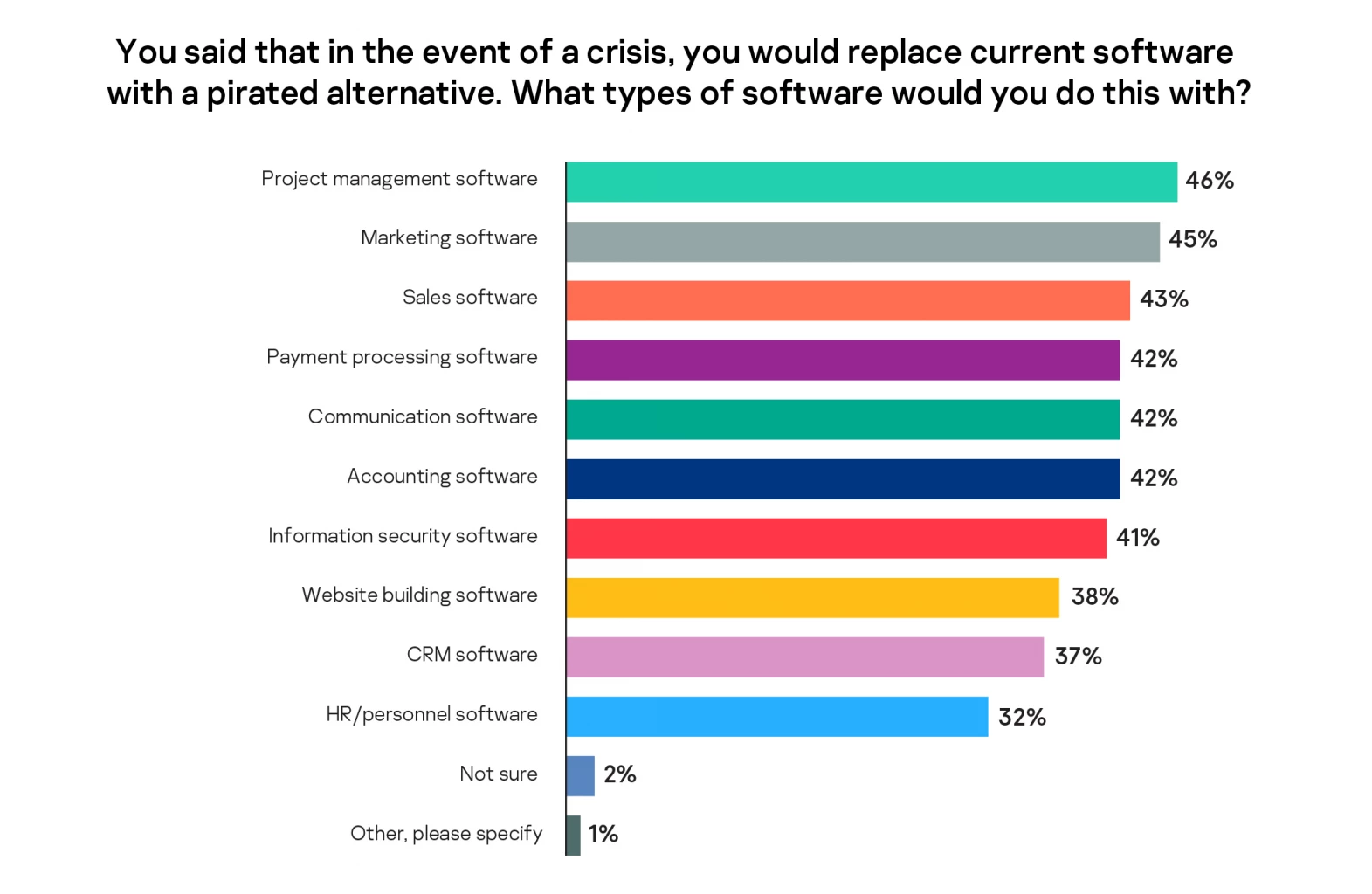
The Kaspersky study aims to explore which crisis management tactics business leaders find most successful, and how some steps can seriously affect a company’s cyber resilience. Safe measures such as seeking lower-cost contractors and adopting free alternatives of usual software are most popular with the respondents, gaining 41% and 32% respectively, but 15% of surveyed business leaders would replace their software with a pirated version to cut costs.

As for the type of programs respondents believe they could replace with hacked copies, the majority chose project management, marketing and sales software – 41% even agree to use a pirated cybersecurity software.

24% of medium-size businesses ready to use pirated software to cut costs: Kaspersky

“A lack of resources is a common situation for small and medium businesses but use of a pirated or hacked software should be completely excluded if an organization values its safety, reputation and income. Pirated copies of software usually come with Trojans and miners and do not contain the fixes or patches released by developers to close vulnerabilities that might be exploited by cybercriminals. Official free alternatives are much better options for those who need to save money on IT,” – comments Alexander Shlychkov, Product Marketing Lead at Kaspersky

To avoid data leakage and financial losses caused by infected software installation, implement the following Kaspersky’s recommendations:    

•    Make sure your employees use standard accounts without admin rights. That will prevent them from accidentally installing a Trojan mistaken for productivity software.


•    You can use free security solutions. They usually have fewer functions than paid products but still might be very helpful. Choose a solution based on the independent tests’ results, and download it directly from the developer’s site. 

•    To avoid paying hidden miner electricity bills, try to constantly monitor the efficiency of your device. If your gadget is slowing down, overheats and makes a lot of noise even when no one is using it, someone might have installed a miner on the device which is overloading the processor and video card. Use a security solution that detects not only malicious programs but also potentially unwanted instalments. 

•    Update your operating system, security software, browser and all the programs you work with as soon as a new update comes out. 

•    Implement regular backups of important files in a cloud service and on alternative hardware. That will allow you to have a copy even if ransomware encrypts your data. A security solution with remediation feature will let you roll back actions performed by malware in the operating system, delivering protection against cryptolockers. 

More recommendations on how to protect your business with a limited budget are available on a dedicated Kaspersky Low Budget Hub.

Tech Review: Sony Xperia 5 IV: Every budding photographer’s dream come true

#SootinClaimon.Com : ขอบคุณแหล่งข้อมูล : หนังสือพิมพ์ The Nation.

https://www.nationthailand.com/business/tech/40022314

Tech Review: Sony Xperia 5 IV: Every budding photographer’s dream come true

Tech Review: Sony Xperia 5 IV: Every budding photographer’s dream come true

TUESDAY, NOVEMBER 22, 2022

A powerful smartphone that takes beautiful snapshots to share instantly is the dream for most users, but the reality in their pockets can often be disappointing.

Step forward Sony’s new Xperia 5 IV – it may just be the holy grail snap-happy people may be seeking.

The fourth edition of Xperia 5 is powered by the fast Qualcomm Snapdragon 8 Gen 1 Mobile Platform chipset with a hefty working memory of 8 gigabytes and 256GB storage.

It’s 6.1-inch wide, 21:9 format display using a 120-Hertz OLED panel with a 2,520×1,080 pixel resolution serves as a perfect viewfinder for both still photos and videos.

Enthusiasts will love that Sony has packed Xperia 5 IV with the advanced photography technology it developed for its famous Alpha series cameras.Tech Review: Sony Xperia 5 IV: Every budding photographer’s dream come true

With a ZEISS-quality lens calibrated specially for this smartphone and its Exmor RS sensors, the new Xperia 5 IV can make snapping and sharing a joyful experience.

The smartphone camera comes with three lenses and three focal lengths, each with a 12-megapixel resolution. For ultrawide focuses of 16mm, it uses a 1/2.5-inch Exmore RX sensor, a 1/1.7-inch sensor for a 24mm standard focal length and a 1/3.5-inch sensor for a tele-focal length of 60mm. Each lens is bright with a wide aperture of F1.7 to F2.4.

The smartphone comes packed with Sony’s own photography software called Photo Pro, which offers two modes – Basic and Auto/P/SM modes.

In most cases, you can use the Basic mode to snap regular photos or clips, but if you want to be more creative and produce high-quality clips or pics, you can opt for the Auto/P/S/M modes.Tech Review: Sony Xperia 5 IV: Every budding photographer’s dream come true

For the Basic mode, the software uses AI technology to detect scenes and lighting conditions before it adjusts shooting parameters automatically. The AI can choose from shooting formats like gourmet, macro, soft snap, infant, backlight portrait, backlight, night portrait, night scene, low light, landscape and spotlight and display the respective icon on the screen.

While testing the Xperia 5 IV, I found that it managed to easily capture top-quality shots using Basic mode. It effectively handled difficult backlit conditions effectively capturing dark subjects clearly with a brightly lit background.

The Auto/P/S/M modes were also fun, as they turn the phone’s display into a large viewfinder with control buttons on the right for horizontal shooting.

However, the buttons take up almost half of the screen if you try to take a vertical picture.

The Auto mode is much like the Basic mode when it comes to AI detecting scene types and automatically adjusting shooting parameters, though the Auto mode gives you more control.

For instance, you can use the control panel on the right-hand side to select between single-shot autofocus (AF) and continuous AF.

You can also choose between a wide and centre focus, as well as the drive mode, which offers single and continuous shooting both in high and low quality, self-timer and HDR continuous shooting.

While testing, I used the continuous shooting Hi mode to capture shots of flying seagulls. Normally, it’s difficult to capture clear, in-focus shots of flying birds, but I used the continuous shooting mode to capture bursts of images before selecting those that caught the birds in focus with bright colours.

Tech Review: Sony Xperia 5 IV: Every budding photographer’s dream come trueIf you are an experienced photographer, you will enjoy the P/S/M modes or Programme auto, Shutter speed priority and Manual exposure.

The P mode gives you more control compared to the Auto mode. For instance, you can select a white balance and ISO setting. You can even select a metering mode among multi, centre and spot modes of light metering, as well as adjust the exposure value to make the image brighter or darker.

In S mode, you select the shutter speed and the camera will adjust the rest of the parameters for you or you can try to set some parameters.

The M mode is more advanced as the Xperia 5 IV gives you full control from shutter speed to other parameters.

Tech Review: Sony Xperia 5 IV: Every budding photographer’s dream come trueThe smartphone is also capable of shooting 4K HDR video at a high frame rate of 120fps and also comes with a 12MP front camera with an f2.0 lens for beautiful selfies.

Its display with a native refresh rate of 120 Hertz is very good for enjoying movies and playing games.

The display function comes with Motion Blur Reduction technology that reduces the blurriness of fast-moving pictures and the phone also comes with a Game Enhancer function that helps adjust various settings so you can play graphics-intensive games smoothly.

The phone also comes with three apps for video and music creators. Music Pro lets you record and edit your compositions like you are in a studio, while the Cinema Pro and Video Pro apps allow you to shoot and edit your clips like a pro.

The Xperia 5 IV can also function as a high-quality digital music player, capable of playing high-resolution audio (Hi-Res Audio) formats.

Tech Review: Sony Xperia 5 IV: Every budding photographer’s dream come trueI played the old Eagles classic “Hotel California” in Flac 24bit/192kHz Hi-Res Audio format, using Audio-Technica ATH-ANC700BT headphones that support Hi-Res Audio and heard it delivered with clarity, good details and deep bass.

The CPU chipset of the phone is really fast thanks to its eight cores, one running at 3GHz, three at 2.50 GHz and the remaining four at 1.79GHz, according to Geekbench 5 benchmarking app. The app reported that the phone has a single-core score of 1,146 and a multi-core score of 3,311.

As a smartphone, Sony Xperia 5 IV runs on the Android 12 operating system and supports the 5G network.

Its large 5,000mAh battery is packed with fast-charging technology which has the phone getting a 50% charge in 30 minutes.

Sony Xperia 5 IV has a suggested retail price of 39,990 baht, though early birds will get wireless LinkBuds S worth 7,490 baht or an 8,000 baht discount. The offer is only valid until November 30.

Key specs

OS: Android 12

Networks: 2G, 3G, 4G, 5G

CPU: Snapdragon 8 Gen 1 Mobile Platform

Memory: 8GB RAM

Storage: 256 GB UFS

Rear camera: Triple cameras with 12MP resolution each with f1.7, f2.2 and f2.4 lens

Front camera: 12MP with f2.0 lens

Display: 6.1-inch 120hz OELD panel with 2520×1080 pixel resolution

Battery: 5000mAh

Dimensions: 156x67x8.2 mm

Weight: 172g

Paisal Chuenprasaeng

Special to The Nation